Customer Sign-In & Registration Guide
- Home
- Customer Sign-In & Registration Guide
To protect our store from spam and fraudulent orders, guest checkout is no longer available.
All customers must create an account or sign in before placing an order.
The good news is that signing in is quick and easy. You can log in using either:
- Username / Email and Password
- Phone Number with OTP (One-Time Password)
1. Sign In to Your Account
If you already have an account, click the Account icon in the top menu.
This will take you to the login page where you can sign in.
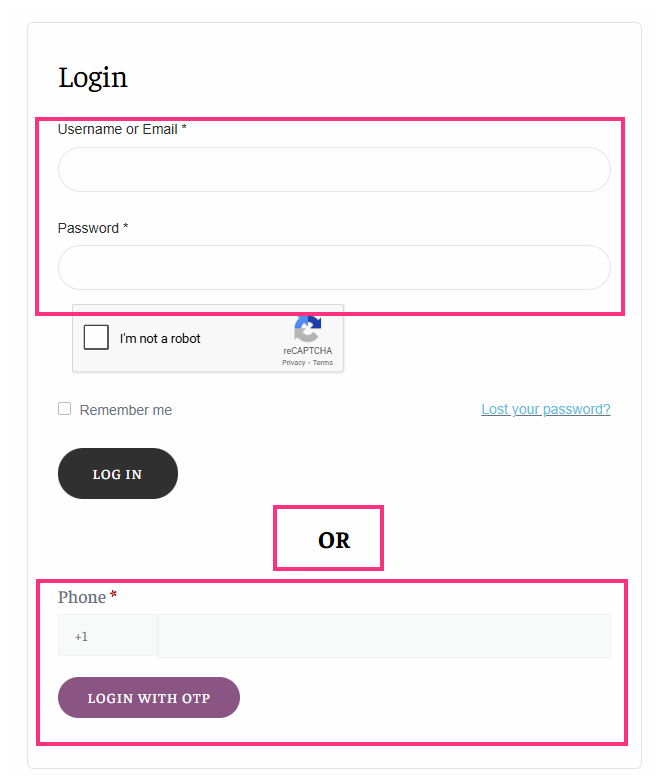
2. Login Using Username or Email
On the login page you will see the standard login form.
Enter:
- Your Username or Email
- Your Password
Then click LOG IN.
3. Login Using Phone OTP
You can also sign in using your phone number and OTP verification.
Steps:
- Enter your phone number
- Click Login with OTP
- Enter the verification code sent to your phone
- You will be logged in instantly
This method allows you to log in without entering your password.
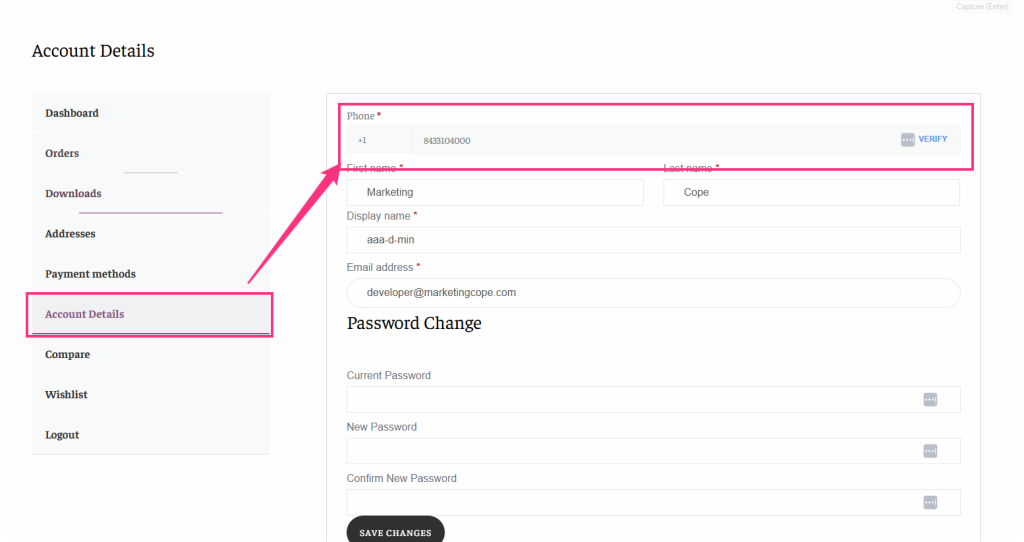
4. Add Phone Number for OTP Login (Existing Users)
You can also sign in using your phone number and OTP verification.
Steps:
- Enter your phone number
- Click Login with OTP
- Enter the verification code sent to your phone
- You will be logged in instantly
This method allows you to log in without entering your password.
5. Create a New Account (New Customers)
If you do not have an account, you can create one from the Register section.
Steps:
- Enter your phone number
- Click Verify
- Enter the OTP code
- Fill in the required details:
- Username
- Email Address
- Password
- Click Register
Your account will be created instantly.
Important Notes
- Guest checkout is disabled to prevent spam and fraudulent orders.
- All customers must sign in before placing orders.
- Phone verification allows quick and secure OTP login.
- Once your phone number is verified, you can log in easily using OTP anytime.
If you experience any issues signing in, please contact our support team and we will be happy to assist you.